
GEONAVIGATE / PRACTICAL GUIDE
Striplog software: LAS import, MD/TVD and geological records
Create editable vertical and horizontal striplogs with GeoNavigate’s public browser tools.
A browser striplog editor for reviewed geological data
The public GeoNavigate striplog editor works locally in your browser without an account. Import supported LAS 2.0 data, review the well identity and curve mappings, and build vertical or horizontal striplogs with geological observations. The viewer does not upload your source files; local browser drafts are independent of Infinity account storage.
Start with a reviewed LAS file
- Import LAS 2.0. Check the internal WELL/UWI identity against the intended well. Review depth and curve units, null values and available coverage.
- Map the curves. Identify the depth, gamma-ray, rate-of-penetration and gas channels that are actually present. Review the accepted data before plotting.
- Choose a depth basis. Use vertical MD, vertical TVD or horizontal MD as appropriate for the source and interpretation.
- Add observations. Edit lithology intervals, descriptions, grain properties, shows, symbols and photographs with their source depths.
- Review and export. Save a complete portable project and select the plot or tabular exports needed for the handover.
MD and TVD are different coordinates
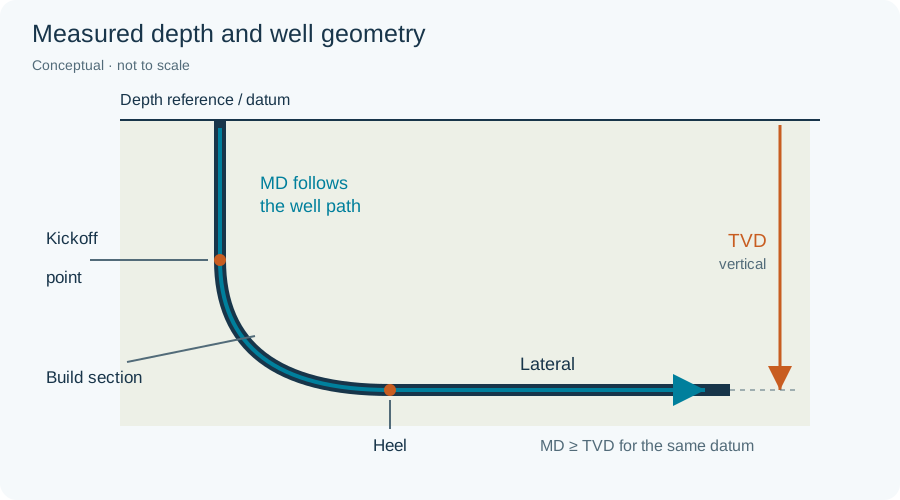
Measured depth follows the borehole. A TVD display needs either native TVD log data or a reviewed survey covering the relevant MD range. Confirm units, well identity and the depth datum. The tool does not extrapolate a trajectory beyond available survey support.
A horizontal well can move up and down in TVD as MD increases. Those repeated vertical depths do not form a unique vertical log; retain the MD-indexed interpretation when a vertical conversion would be ambiguous.
What you can record and export
- Editable lithology intervals and geological descriptions.
- Authored grain, mineral, fossil, show and property observations.
- Depth-linked photographs, symbols and formation drawings.
- Portable project JSON, tabular CSV exports, a current-window SVG and Print/PDF output.
Download a complete project as a portable backup. A browser draft is local to that product and browser; it is not automatically synchronized into an Infinity well.
Interpret gamma-ray bands with geological context
Editable gamma-ray bands can provide a starting classification. They do not uniquely identify lithology, porosity, permeability or hydrocarbons. Review the samples and formation context, especially where radioactive sands, carbonates or other alternatives can produce similar responses.
Common import checks
- The filename and LAS header identify different wells
- Resolve the identity conflict before accepting the source; a filename alone is not sufficient provenance.
- A TVD projection is missing
- Check that the reviewed survey covers the source MD range and uses compatible units and datum.
- A curve has gaps
- Inspect null values and missing coverage. A display gap should not be treated as an interpolated measurement.
Learn the terminology in the oilfield glossary, explore Infinity geosteering, or ask about your workflow.